Tampilkan postingan dengan label Update AV. Tampilkan semua postingan

Avast 5.0: Penampilan baru, kinerja baru ..

Setelah banyak ditunggu, tidak hanya pecinta Antivirus Avast, tapi juga pengguna antivirus gratis, kemarin (19 Januari 2010) Avast merilis versi Antivirus terbaru, Avast 5, termasuk Avast Free Edition. Avast termasuk salah satu vendor antivirus yang menyediakan versi gratis (free) dengan fitur yang patut dipertimbangkan dibanding antivirus lainnya.
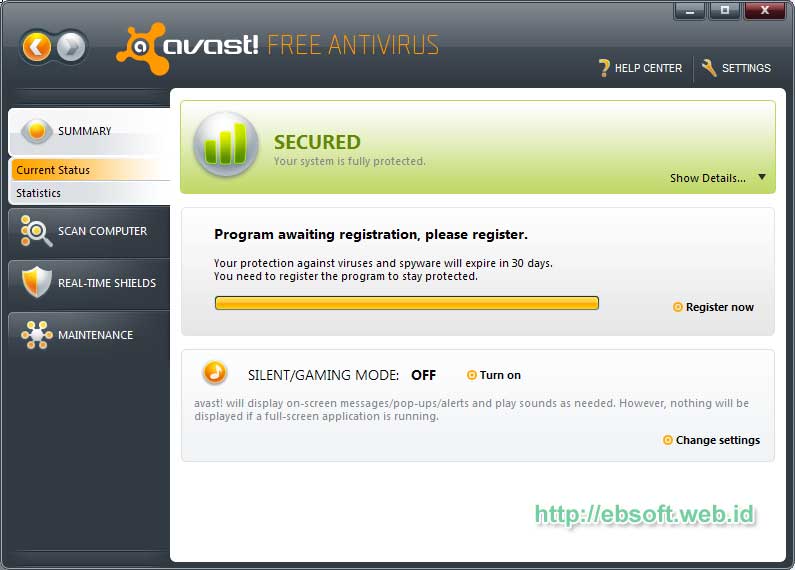
Di versi baru ini, Avast tampil dengan tambahan fitur baru dan perbaikan tampilan sebelumnya.

Selain produk gratis, avast juga merilis Pro Antivirus dan Internet Security. Perubahan yang sangat tampak adalah perubahan tampilan, selain itu sebelumnya Avast yang menamakan antivirus gratisnya dengan Avast Home Edition, kali ini berganti menjadi Avast Free Antivirus. Meskipun free edition, tetapi kemampuan proteksi dari malware sama dengan pro edition, yang membedakan lebih ke fiturnya dan opsinya.

Fitur-fitur Avast 5.0 Free Edition antara lain :
  • Proteksi dari virus dan spyware secara terus menerus
  • Memastikan email yang dikirim dan di terima aman.
  • Melindungi dari infeksi ketika sedang chatting
  • Melindungi dari website yang berbahaya, ketika browsing
  • Anti rootkit ( real time)
  • Web shield
  • IM/P2P shiled
  • Network Shield
  • Behavior shield
Fitur dan penjelasan lebih lengkapnya silahkan melihat Avast Free Download. Versi baru ini memberikan perbaikan pada engine Antivirus dan antispyware intelligent scanner, Silent/Gaming mode dan juga Behavior shield. Jika ingin mengetahui perbandingan antara Free Edition, Pro editian dan Internet Security, silahkan melihat Perbandingan Edisi Avast
Sistem minimal yang dibutuhkan:
* Processor Pentium 3, 128 MB RAM, 100 MB of free hard disk space
* Microsoft Windows 2000, Microsoft Windows XP/Vista/7 (32/64 bit)
Melihat fitur serta tampilan barunya, Avast 5.0 Free ini memang patut untuk dicoba, sebelumnya saya kurang suka dengan tampilannya yang seperti media player (meskipun skin bisa diganti). Tetapi kali ini tampilan tampak lebih segar. Bagi anda yang memerlukan antivirus gratis dengan fitur lengkap, Avast ini mungkin solusinya
Download Avast 5.0 Free Edition ( sekitar 38.3 MB)

sumber: here


Kaspersky Virus Removal Tool 30.01.2010

kaspersky-virus-removal-tool-30-01-2010

Kaspersky Virus Removal Tool 28.01.2010
| 60 MB
Another virus scanner and detection software from Kaspersky. The Kaspersky Virus Removal Tool application was designed to be another virus scanner and detection software from Kaspersky. The product will scan the specified locations for any virus threats and remove them or send to Quarantine folder.
Password : www.hoaxfree.com
Download Now Kaspersky Virus Removal Tool 30.01.2010


AVG Internet Security 9.0

avg-internet-security-9-0-697-1729
SORRY FOR IMAGE I'M USE AVG 8.5 BUT THIS SOFTWARE IS VERSION 9.0,, IS REALLY .. !!!!


AVG Internet Security provides complete security protection against all of the most serious Internet threats, including viruses, worms, spyware, trojans, adware, hackers and spam.

Prevention is better than cure! Comprehensive cyberthreat prevention for Windows-based home users from one of the World’s most trusted security companies.
Enjoy your online life free from worry with AVG Internet Security.
Easy to download, install and use
Protects against viruses, spyware and online threats

NEW Prevents identity theft
Real-time security makes your online surfing, searching and chatting safe
Top-quality protection that does not slow your system down
Free support and service around the clock and across the globe
Compatible with Windows XP, Windows Vista and Windows 7
Here are some key features of “AVG Internet Security”:
· Antivirus and Anti-Spyware: protection against viruses, worms, spyware, and trojans
· Identity Protection: helps prevent identity theft
· Anti-Rootkit: protection against hidden threats (rootkits)
· Web Shield: screens downloads and IM for infections
· LinkScanner: blocks poisoned web pages in real time
· Anti-Spam with anti-phishing: filters out unwanted and fraudulent e-mails
· Firewall: blocks hacker attacks
· System Tools: tailor AVG for your particular needs
· 100% virus detection – AVG’s scanning engine has received numerous awards for its excellent detection of “in the wild” viruses, including the VB100% award. Its unique combination of detection methods provides full protection against viruses, worms and trojans.
· Cutting-edge anti-spyware technology – Using the latest state-of-the-art detection technology, AVG detects spyware, adware, DLL-trojans, keyloggers, and much more. Malware hidden in data streams, archives, or the Windows registry is also detected.
· Full on-access protection – The powerful AVG Resident Shield provides maximum protection by scanning every file opened, executed, or saved. It also prevents the opening or executing of infected files.
· Flexible intelligent scanning – The AVG Resident Shield can include/exclude files from being scanned based on individual file extensions and can handle exceptions for potentially unwanted programs such as adware.
· Full e-mail protection – AVG checks every e-mail sent or received, providing full protection from e-mail-borne threats. AVG supports all leading e-mail clients, including MS Outlook, The bat!, Eudora, and all other SMTP/POP3-based e-mail clients, such as Outlook Express. Encrypted connections using SSL are also supported.
· E-mail spam and phishing filtering – AVG checks every e-mail received, using the latest technology and up-to-the-minute spam signatures to ensure maximum detection rates for spam and phishing attacks.
· Automatic threat handling – AVG can automatically heal or remove infected files and other threats such as trojans, worms and spyware.
· Control over all network access – The AVG Firewall monitors all communication to and from the computer, blocking external attacks and preventing trojans from exporting confidential data. The AVG Firewall configuration wizard automatically creates access rules for all popular software. In addition the firewall can switch profiles automatically, based upon the current conection type, ensuring seamless changeover for notebooks.
· Powerful scheduling – AVG automatically provides recommended daily schedules for scanning and updating, and also allows you to create custom-scheduled events.
· Multiple language support – No need to buy a special language
Requirements:
· Intel Pentium CPU 1,2 GHz
· 250 MB of free hard drive space (for installation purposes)
· 256 MB of RAM memory
What’s New in This Release:
· New Firewall supporting automatic decisions (trusted database principle).
· Significant acceleration of scanning (caching).
· New option to define scanning exceptions for specific files.
· New integrated AVG Identity Protection component.
· Improved and easier to navigate graphical user interface.
· Setup user experience improved.
· Gaming mode enhancement.
· Improved detection and reporting of errors during update.
· Application repeatedly attempts to download the latest update (in case any error occurs at first).
· Possibility to assign sound to a certain event (scan started, threat found etc.).

Download AVG Internet Security 9.0.697.1729 now !

Password:www.hoaxfree.com

PCMAV 2.0a build2

Image

Update Build 2 dari antivirus PC Media Antivirus hadir dengan penambahan 19 pengenal varian virus baru. Bagi Anda pengguna PCMAV 2.0a sangat disarankan segera melakukan update, agar PCMAV Anda dapat mengenali dan membasmi virus lebih banyak lagi. Dan untuk mendapatkan dan menggunakan update PCMAV ini, Anda cukup menjalankan PCMAV Cleaner (PCMAV-CLN.exe), tentunya komputer harus dalam keadaan aktif terhubung ke Internet (non-proxy). Fitur Automatic Updates dari PCMAV akan secara otomatis men-download dan meng-update database dari PCMAV.

Namun bagi Anda yang ingin mendapatkan file update tersebut secara manual, Anda bisa men-download file-nya melalui beberapa alamat download yang saya sediakan.

Letakkan file hasil download tersebut (update.vdb) ke dalam folder \vdb. Jika sebelumnya telah terdapat file update yang lama, Anda cukup menimpanya. Pastikan sekali lagi, bahwa nama file update adalah update.vdb, jika berbeda cukup ubah namanya. Dan nanti saat Anda kembali menjalankan PCMAV, ia sudah dalam keadaan kondisi ter-update.

Download PCMAV 2.0a Update Build2 :

PCMAV 2.0 Final Release

PCMAV 2.0 Valkyrie versi final alias bukan beta diluncurkan bertepatan dengan ulang tahun PC Media ke-8. Versi baru dengan kode Valkyrie ini mengusung berbagai macam fasilitas baru serta perbaikan bug yang ada di PCMAV sebelumnya. Berikut ini beberapa fitur baru dalam PCMAV 2.0 Valkyrie.

PCMAV 2.0 Valkyrie

  • Tampilan baru berwarna kuning dengan icon bebek. Kenapa ya iconnya bebek ? :D
  • Pencarian virus yang lebih cepat dan stabil.
  • Penambahan engine IntelligentScan (iScan) untuk ClamAV untuk meningkatkan kecepatan pendeteksian ketika engine ClamAV digunakan.
  • RealTime Protector (RTP) dapat digunakan di Vista dan Windows 7.
  • Virus karantina untuk mengisolasi file-file yang dicurigai bervirus.
  • Virus Submit untuk pengiriman otomatis file-file yang dikarantina ke PC Media.
  • PC Media Updates Manager untuk update online otomatis, baik untuk file database virus PCMAV (update.vdb) maupun ClamAV (main.cvd & daily.cvd).
  • PCMAV Cleaner kini lebih cepat loadingnya karena tidak lagi memeriksa memory/sistem start-up Windows ketika RTP telah aktif.
  • Fitur scan file dan folder melalui klik-kanan pada Explorer.
  • Perbaikan kesalahan deteksi (false alarm) heuristik pada beberapa program dan script, serta perbaikan beberapa minor bug.
  • Pcmav.vdb kini diletakkan di folder tersendiri yaitu folder vdb. Sedangkan Engine dan CVD tambahan ClamAV kini diletakkan di folder “\plugins\ClamAV”.

Download

Berikut ini PCMAV 2.0 Valkyrie + Update Build 2 (Ukuran 3,5 MB)

Update Anti Virus

ANSAV

Download antivirus-nya.
Update-nya.

Extract dan letakkan file “vdb.dat” ke direktori tempat ANSAV berada. Apabila sukses pada jendela about “Last Database Update” akan menunjukkan tanggal terakhir database diperbaharui.


AVAST Antivirus

Untuk cek versi dan download update.
Versi yang gratis dari Avast Antivirus Home Edition.


AVIRA Antivir

Link 1, keluar setiap hari

Cara update :
  1. Download file update diatas.
  2. Buka Start > Run terus isi dengan msconfig dan langsung tekan Enter.
  3. Pindah pada tab Startup kemudian cari yang ada hubungannya dengan kata "antivir", terus hilangkan centangnya.
  4. Pindah pada tab Service kemudian cari yang ada hubungannya dengan kata "antivir", terus hilangkan centangnya.
  5. Restart komputer.
  6. Copy-kan isi (bukan dalam bentuk rar/zip, kalau rar/zip atau format extract lainnya, di extract dulu sampai ada isinya) dari file update ke bagian folder instal antivir (misalnya, C:/program files/antivir) kalau ada permintaan replace, replace saja.
  7. Ulangi langkah 3 & 4 tetapi kali in berikan centang lagi (kembalikan seperti semula).
  8. Restart komputer
  9. Selesai.

AVG

AVG Update
Free Version


ClamAV

Lengkap, tetapi keluar tidak menentu, biasanya pada akhir bulan.
Harian, Kalau ini keluarnya setiap hari. Ukurannya juga kecil.


Fprot

http://www.f-prot.com/download/home_user/
http://updates.f-prot.com/cgi-bin/get_randomly?fp-def
http://updates.f-prot.com/cgi-bin/get_randomly?macrdef2


Kaspersky Anti Virus

Update versi 5.0 :
Total.
Minggu ini.

Update versi 6.0 :
Total.
Minggu ini.

Update versi 7.0 :
Total.
Minggu ini.

Update versi 8.0:
Bisa juga di update pake database (update) versi 7, atau kalau mau lebih meyakinkan baca ini.

Kaspersky Internet Security 7 or 8 or 2009 Working Keys
Tested : not tested
Status : active
Just go to --> http://kavkiskey.com


McAfee

Pilih salah satu downloadnya.


Bart PE

Live CD, bisa ditambahkan plug-in.
Lebih jelasnya untuk panduan dan download, silahkan kunjungi www.nu2.nu/pebuilder/

MiniPE

Live CD
MiniPE.org
Passnya : thecavern


NOD32

Tempat download NOD32
Update offline

Cara update :

1. Download update dari link diatas (update offline).
2. Kumpulkan dalam satu folder.
3. "Add" direktori tersebut (folder pada langkah nomor 2) pada program NOD32.
4. Update berjalan.

Kalau yang ada internet nya juga bisa Automatic Update.


Norman

Untuk download setahu saya memang tidak ada, tapi masih bisa diakali. Syaratnya kita punya antivirus norman yang terkoneksi dengan internet (+ update-nya jalan). Berikut langkah-langkahnyanya:

1. Copy isi Seluruh Folder Norman Antivirus yang telah ter-update defaultnya di C:\Norman kecuali Folder Bin, Info,dan Nvc, dan File zlh_nse.dll & Nse_w32.dll di Folder C:\Norman\Nse\Bin juga File zlh_qtn.dll & Njev_Qtn.dll di Folder C:\Norman\Qtn\Bin
2. Lalu Paste folder Norman Antivirus pada Komputer yang sudah ter-Install Norman tetapi tidak ada koneksi Internet.
3. Defaultnya sama dengan di atas yaitu di C:\Norman

Singkatnya :
Anda Copy Seluruh Folder C:\Norman dari Komputer yang telah di Update ke Flash Disk. Lalu sebelum di Paste ke Komputer yang tidak ada koneksi Internetnya, terlebih dahulu Delete 3 Folder dan 4 File yang disebutkan di atas.


Norton Antivirus/ Symantec

Link Download lengkapnya.


PANDA ANTIVIRUS

Update
User : CCF226BELL
Password : GBRYG9IP


Cara Meng-Update Antivirus Panda

File ZIP td isinya diekstrak ke dalam folder :
C:\program files\panda software\panda antivirus 2007 kalau dia minta ada yang di replace, replace saja. Setelah itu restart komputer Anda.

Panda 2008 = http://rapidshare.com/files/105284894/panda_av_fi.rar


PC Media Antivirus

Kunjungi http://pcmav.biz/.
Untuk download dan melihat perkembangan atau info terbaru kunjungi Virus Indonesia


Trendmicro

Link 1

Update Anti Virus

ANSAV

Download antivirus-nya.
Update-nya.

Extract dan letakkan file “vdb.dat” ke direktori tempat ANSAV berada. Apabila sukses pada jendela about “Last Database Update” akan menunjukkan tanggal terakhir database diperbaharui.


AVAST Antivirus

Untuk cek versi dan download update.
Versi yang gratis dari Avast Antivirus Home Edition.


AVIRA Antivir

Link 1, keluar setiap hari

Cara update :
  1. Download file update diatas.
  2. Buka Start > Run terus isi dengan msconfig dan langsung tekan Enter.
  3. Pindah pada tab Startup kemudian cari yang ada hubungannya dengan kata "antivir", terus hilangkan centangnya.
  4. Pindah pada tab Service kemudian cari yang ada hubungannya dengan kata "antivir", terus hilangkan centangnya.
  5. Restart komputer.
  6. Copy-kan isi (bukan dalam bentuk rar/zip, kalau rar/zip atau format extract lainnya, di extract dulu sampai ada isinya) dari file update ke bagian folder instal antivir (misalnya, C:/program files/antivir) kalau ada permintaan replace, replace saja.
  7. Ulangi langkah 3 & 4 tetapi kali in berikan centang lagi (kembalikan seperti semula).
  8. Restart komputer
  9. Selesai.

AVG

AVG Update
Free Version


ClamAV

Lengkap, tetapi keluar tidak menentu, biasanya pada akhir bulan.
Harian, Kalau ini keluarnya setiap hari. Ukurannya juga kecil.


Fprot

http://www.f-prot.com/download/home_user/
http://updates.f-prot.com/cgi-bin/get_randomly?fp-def
http://updates.f-prot.com/cgi-bin/get_randomly?macrdef2


Kaspersky Anti Virus

Update versi 5.0 :
Total.
Minggu ini.

Update versi 6.0 :
Total.
Minggu ini.

Update versi 7.0 :
Total.
Minggu ini.

Update versi 8.0:
Bisa juga di update pake database (update) versi 7, atau kalau mau lebih meyakinkan baca ini.

Kaspersky Internet Security 7 or 8 or 2009 Working Keys
Tested : not tested
Status : active
Just go to --> http://kavkiskey.com


McAfee

Pilih salah satu downloadnya.


Bart PE

Live CD, bisa ditambahkan plug-in.
Lebih jelasnya untuk panduan dan download, silahkan kunjungi www.nu2.nu/pebuilder/

MiniPE

Live CD
MiniPE.org
Passnya : thecavern


NOD32

Tempat download NOD32
Update offline

Cara update :

1. Download update dari link diatas (update offline).
2. Kumpulkan dalam satu folder.
3. "Add" direktori tersebut (folder pada langkah nomor 2) pada program NOD32.
4. Update berjalan.

Kalau yang ada internet nya juga bisa Automatic Update.


Norman

Untuk download setahu saya memang tidak ada, tapi masih bisa diakali. Syaratnya kita punya antivirus norman yang terkoneksi dengan internet (+ update-nya jalan). Berikut langkah-langkahnyanya:

1. Copy isi Seluruh Folder Norman Antivirus yang telah ter-update defaultnya di C:\Norman kecuali Folder Bin, Info,dan Nvc, dan File zlh_nse.dll & Nse_w32.dll di Folder C:\Norman\Nse\Bin juga File zlh_qtn.dll & Njev_Qtn.dll di Folder C:\Norman\Qtn\Bin
2. Lalu Paste folder Norman Antivirus pada Komputer yang sudah ter-Install Norman tetapi tidak ada koneksi Internet.
3. Defaultnya sama dengan di atas yaitu di C:\Norman

Singkatnya :
Anda Copy Seluruh Folder C:\Norman dari Komputer yang telah di Update ke Flash Disk. Lalu sebelum di Paste ke Komputer yang tidak ada koneksi Internetnya, terlebih dahulu Delete 3 Folder dan 4 File yang disebutkan di atas.


Norton Antivirus/ Symantec

Link Download lengkapnya.


PANDA ANTIVIRUS

Update
User : CCF226BELL
Password : GBRYG9IP


Cara Meng-Update Antivirus Panda

File ZIP td isinya diekstrak ke dalam folder :
C:\program files\panda software\panda antivirus 2007 kalau dia minta ada yang di replace, replace saja. Setelah itu restart komputer Anda.

Panda 2008 = http://rapidshare.com/files/105284894/panda_av_fi.rar


PC Media Antivirus

Kunjungi http://pcmav.biz/.
Untuk download dan melihat perkembangan atau info terbaru kunjungi Virus Indonesia


Trendmicro

Link 1