Tampilkan postingan dengan label Software. Tampilkan semua postingan

Internet Download Manager 6.18.7 + fix Crack and FAKE SERIAL


Internet Download Manager 6.18 Build 7 Retail + Fix exe & Serials
*** [Fix fake serial number & browser and system integration error windows startup] ***

Taukan kamu? bahwa idm lagi besar besaran mengindentifikasi idm yang fake serial? nah jangan khawatir. Gue bakal ngebagiin idm yang aman dan ga bakal kedetect fake serial lagi! buat yang mau. silahkan download idm 6.18 build 7 di bawah ini. Happy Download! 

What's new in version 6.18 Build 7
- Fixed a critical bug in IE integration module
- Improved Windows 8.1 and IE 11 integration
- Resolved compatibility issues with Google Chrome 31
- Improved video recognition in web players

Cara bermain Dota dengan GPROXY

Siapa yang pernah Main dota? tau kah lu semua, kalo main dota itu kalo kita DC, bisa terkoneksi lagi asalkan kita tidak close dota. Apa belom tau? Pernah denger kalo lagi main dota, suka suka ada yang muncul di chat bar “GProxy”? nah itu yang bikin kita bisa terkoneksi lagi sama gamenya. Gue kenalkan nih GPROXY ++ 2.0

Kenapa gue share gproxypluspluscb2.0 ?

Karena pemakainnya sangat gampang dibanding dengan gproxy yang lain

FAQ
A : Apa itu gproxy?
F : Gproxy adalah tools buat reconnect saat bermain,gak cuman buat dota aja,buat minigames juga bisa,asal bot nya di support oleh gproxy
A : Bot apa aja yang udah di support oleh gproxy?
F : Semua bot yang mensupport GProxy!

Oke langsung aja gue kasih link downloadnya dan cara pemakaiannya

Cara Pemakaian gproxypluspluscb2.0 :

1. Pertama download file yang sudah gue share linknya

2. Extract ke folder dota lu aja biar enak, kalo bisa di buat shortcutnya di desktop

4. Lalu Buka gproxy.exe


5. Setelah terbuka,jawab pertanyaan dari gproxy.exe

6. Untuk pertanyaan server,di isi dengan ip server tersebut..

    (gua memakai contoh ip free ) : free.indogamers.us


7. Untuk pertanyaan lain tinggal klik enter sampai 3x aja

Spoiler:


8. Lalu kalian bisa langsung buka DotA WC3 (yang iconnya merah) tanpa harus menutup gproxy.exe

9. Coba di test di room bot dulu,kalo bisa bot sendiri

10. Jika terjadi DISCONNECT,jangan menutup gproxy.exe

11. Batas waktu untuk reconnect kira-kira sekitar 180 detik

Thanks to: DGI FORUM

Soal Soal Latihan tes CPNS 2013


Pendaftaran tes CPNS 2013 telah di buka. Banyak sekali sub sub pemerintahan yang membuka lowongan menjadi pegawai negeri. Buat yang mau daftar silahkan cari link link dimana tempat pendaftaran itu berasa, gua pribadi sih, ga tau situs lowongannya. Katanya sih tertutup, jadi lo musti cari info dari media media resmi. 
Buat menunggu waktu Tes tertulis, alangkah baiknya lo belajar dulu nih tentang soal soalnya, katanya sih susah. Disarankan belajar terlebih dahulu, karena banyak latihan banyak bisa.
Kali ini gua akan ngasih soal soal cpns 2013 ini secara cuma cuma alias gratis dan ga pake bayar! Soalnya gua ambil dari tes cpns tahun 2011, untuk kedepannya gua bakal update soal soal yang lebih baru lagi.

Link: Soal CPNS (17mb)
Pass: www.latihansoal.comwebsite

Microsoft Office 2013 final RTM download


microsoft office 2013, aplikasi buatan microsoft dan dijalankan pada sistem operasi windows ini adalah aplikasi pembantu pekerjaan kita agar lebih mudah dan cepat. Dengan dukungan yang sangat banyak, kita tidak repot repot untuk mencatat dalam tulisan tangan. Versi ini merupakan versi RTM dan final! ada 2 versi yaitu 64 bit dan 32 bit. Jika kalian ingin mendownload disarankan sesuai dengan operasi sistem anda, sebab jika versi salah, mungkin akan terjadi ketidakstabilan dalam menjalan program ini. 

Download:


saya tidak membagikan key/product id dikarenakan belom ada patcher yang bisa membuatnya jadi full time. Biasanya hanya bersifat sementara, 180 hari. jika mau, kamu bisa menggunakan skype untuk aktivasinya.

berikut cara aktivasi dengan menggunakan skype: (thanks to kaskus)

1. Install Office 2013
2. Sebelum masukin key, jalur internet harap di putus.!
3. Masukin deh prodak ki-nya

4. Klo udah, bakal muncul 2 opsi seperti pada gambar di bawah. Pilih yg aktipasi bai pone.


5. Next, pilih UK.
6. Ntar bakal dapat nomer mikocok UK yg bisa di hubungi FREE..
Gunakan fasilitas skype untuk menghubungi..
***[Pada tahap ini, silahkan re connect inet Anda.]


7. Pada saat menelpon, setelah ada suara dari mikocok pencet tombol 1.
Anda akan diminta memasukkan installation id.
Installation id tertera seperti pada gambar diatas.

note : setelah kolom dimasukkan,
mesin akan menanyakan "on how many computer..bla.bla.bla....
pencet aja tombol 1.
Anda akan diberikan confirmation id.

JIKA, mesin menjawab we are unable/ your product is victim of piracy, silahkan cari key yg tajem..

ENJOY YOUR OFFICE 2013


bila kurang jelas, harap comment yah :D 

siapa yang tidak kenal dengan software pendukung download ini? internet download manager adalah sebuah aplikasi berbasis installer, yang bertujuan untuk mempercepat dan menstabilkan kinerja download. Perbedaan sangatlah jelas jika memakai ini. 
Sampai saat ini IDM telah mencapai versi 6.17 Build 8 Retail, dengan penambahan pada:
-Resolved problems with downloading videos from several sites

buat lo semua yang pengen download ini, silahkan klik link dibawah ini, instalasi harus matikan internet. 
- install IDM
- matikan IDM
- Patch
- jalankan/restart komputer


installer: http://BillionUploads.com/m8wuyngsn521
patch:    http://bit.ly/idm07BRD

Windows 8.1 Build 9600 Leaked download


Buummmmmmmmm! Ada yang merasa aneh dengan gambar diatas? buat yang udah pernah menggunakan windows 8 mungkin sudah tak asing. Windows 8.1 Build 9600 entreprise adalah versi penyempurnaan windows 8 yang keluar pada 2012 lalu. Pada saat release, para pemakai komputer telah bersiap dan sangat antusias menyambut si biru ini. Namun, setelah beberapa bulan release, banyak para pengguna mengeluh dengan kinerja si biru ini. Mulai dari tombol start yang hilang, tampilan windows yang gepeng, sampai tidak berjalannya beberapa aplikasi pada windows 8.

Dukungan Driver dari produsen hardware pun banyak yang tidak membuat support sampai windows 8 dan kita mengharuskan menggunakan versi lama. Sangat disayangkan untuk Operasi Sistem yang di tunggu.

Bagi kalian yang ingin menggunakan dan mencoba versi 8.1 alangkah baiknya menggunakan vMware terlebih dahulu demi jaga jaga supaya tidak terjadi ketidakstabilan pada komputer kalian.

versi ini masih bocoran, karena resminya bulan oktober 2013 baru keluar, jadi diharapkan jangan terlalu menggunakan ini sebagai sistem operasi utama :D

link download single link: putlocker

meainkan hp N gage v. 2.0 di hp symbian (Part 2)


Sekali lagi saya menjelaskan cara-cara memainkan game dari platform N Gage versi 2.0 pada HP Symbian, yang saya juga ambil dari informasi dari yang lain. Dicoba/test dan berjalan pada HP:

1. Nokia 3250
2. Nokia 5500
3. Nokia 5700 XpressMusic (gunakan 6110_5700XM_6120c_20001079.txt untuk memainkan tampilan landscape)
4. Nokia 6110 Navigator
5. Nokia 6120 classic (gunakan 6110_5700XM_6120c_20001079.txt untuk memainkan tampilan landscape)
6. Nokia 6290
7. Nokia E50 (gunakan 6110_5700XM_6120c_20001079.txt or n82_20001079.txt untuk memainkan tampilan landscape)
8. Nokia E51 (gunakan 6110_5700XM_6120c_20001079.txt untuk memainkan tampilan landscape)
9. Nokia E65 (gunakan 6110_5700XM_6120c_20001079.txt untuk memainkan tampilan landscape)
10. Nokia E71
11. Nokia E90 (gunakan 352x416_n95_20001079 and delete this file: "C:\Private\10202be9\persists\20001079.cre")
12. Nokia N71
13. Nokia N73 (gunakan 6110_5700XM_6120c_20001079.txt untuk memainkan tampilan landscape)
14. Nokia N73 Music Edition (gunakan 6110_5700XM_6120c_20001079.txt untuk memainkan tampilan landscape)
15. Nokia N76 (gunakan 6110_5700XM_6120c_20001079.txt untuk memainkan tampilan landscape)
16. Nokia N80 (gunakan 6110_5700XM_6120c_20001079.txt untuk memainkan tampilan landscape)
17. Nokia N81 (mode landscape sudah diaktifkan)
18. Nokia N82 (mode landscape sudah diaktifkan)
19. Nokia N91
20. Nokia N93
21. Nokia N95 (mode landscape sudah diaktifkan, berjalan pada versi firmware 21.0.016, silahkan dicoba versi lainnya)

1. Update firmware cellphone kamu dengan versi yang paling baru, sebelum menuju ke tutorial.
2. Tutorial ini bekerja lebih baik pada cellphone yang belum di HACKED, sangat disarankan dilakukan pada telepon yang sudah di format ke settingan pabrik. Silahkan saja jika ingin dicoba pada cellphone yang sudah di hacked, asal kamu tau apa yang kamu lakukan.
3. Akan lebih baik jika kamu mengikuti tiap langkah tutorial dibawah ini.


Melakukan Format pada Teleponmu

1. Back up data pentingmu (contoh: Images, Sounds, Videos, dsbnya.) MANUAL. Tidak melalui PC-Suite atau program apapun. Copot MMC dan gunakan Card Reader untuk melakukan Back Up.
2. Format telepon dan memory card secara Terpisah.
3. Format menggunakan:
*#7370# - ketik saat keadaan standby atau matikan telepon. Lalu Pencet dan Tahan Tombol Hijau + Angka 3 + Symbol "*" (asterisk/bintang) Secara Bersamaan. Nyalakan telepon. Dan terus tahan sampai telepon meminta diwilayah mana kamu tinggal
4. Format Memory Card via Card Reader di PC dan pilih FAT disk attribut.
5. Setelah Format telepon, dan memory card. Masukan kembali Memory card kedalam telepon. Dan format kembali Memory Card menggunakan Telepon. (Untuk Berjaga-jaga)
6. Masukan kembali file-file penting kamu.

Note : Jika saja terdapat virus pada telepon kamu, melakukan back up menggunakan PC-Suite, virus tersebut juga akan ikut.


  • Nokia E60
  • Nokia E62
  • Nokia E65
  • Nokia E70
  • Nokia N71
  • Nokia N73 / N73 Music Edition
  • Nokia N77
  • Nokia N80
  • Nokia N91 8GB
  • Nokia N92
  • Nokia N93
  • Nokia N93i

  • Nokia 5700 XpressMusic
  • Nokia 6110 Navigator
  • Nokia 6121 classic
  • Nokia 6120 classic
  • Nokia 6124 classic
  • Nokia 6290
  • Nokia E90 Communicator
  • Nokia N76
  • Nokia N81
  • Nokia N81 8GB
  • Nokia N82
  • Nokia N95 8GB
  • Nokia N95
  • Nokia N95-3 NAM

  • Nokia 3250 (firmware v4.14 and v4.60) (jika tidak bisa, gunakan InstallServer_for_Pre-FP1.zip)
  • Nokia 5500 (jika tidak bisa, gunakan InstallServer_for_Pre-FP1.zip)
  • Nokia E50 (jika tidak bisa, gunakan InstallServer_for_Pre-FP1.zip)
  • Nokia E51 (jika tidak bisa, gunakan InstallServer_for_FP1.zip)
  • Nokia E61 / E61i (jika tidak bisa, gunakan InstallServer_for_Pre-FP1.zip)
Details :
InstallServer adalah file yang membantu kamu melakukan install Aplikasi Apa Saja yang bisa kamu dapatkan.

2. N-Gage_1.01_Build_1281_(2008).sisx
Details:
Ini adalah N-Gage 2.0 Launcher yang diluncurkan pada pertengahan 2008. Official installer secara otomatis akan terinstall di telepon kamu dan sudah termasuk N-Gage_Autostart.sisx. kamu harus memiliki paling tidak 5Mb pada telepon kamu walaupun kamu menginstallnya pada Memory Card.


3. xx_20001079.txt -> 20001079.txt
Details:
Berdasarkan pengalaman, file ini dapat ditemukan pada teleponmu (tergantung jenis telepon yang kamu miliki). File ini memiliki hampir semua resolusi layar yang bisa di handle oleh telepon kamu. JIKA FILE INI SUDAH ADA PADA TELEPON KAMU, MAKA KAMU TIDAK PERLU MERUBAHNYA.

Instruksi:
File yang dilampirkan akan memiliki nama "n73_20001079.txt", ganti menjadi 20001079.txt. Jika memang resolusi telepon kamu terpadat pada 20001079.txt.

4. N-Gage_Patch.sis
Details:
BiNPDA patch file. File ini mengganti "trial bar" menjadi "progress bar" pada N-Gage launcher untuk BiNPDA hacked games. Kamu hanya perlu menginstall 1 kali.

5. Any file explorer
Details:
File Explorer apa saja yang bisa kamu dapatkan (FExplorer, Xplorer, YBrowser, dsbnya.) Diperlukan untuk copy 20001079.txt dan InstallServer.exe pada telepon anda.

6. *BARU* Hello_Carbide_by_FCA00000.sisx
Details:
Sebuah on-phone hack dibuat oleh FCA00000. Ini dapat digunakan untuk mematikan Platinum Security pada teleponmu, sama seperti BiNPDA's Security Manager v1.0. Bedanya BiNPDA's Security Manager harus menggunakan MetroTRK atau AppTRK, dimana firmware tidak compatible dengannya, kamu tidak bisa install N-Gage 2.0 tanpanya. Tapi, HelloCarbide adalah .sisx installer yang bisa di install di telepon, secara manual.

NOTE!!!
Berdasarkan pengalaman, kamu harus restart telepon sehingga kembali normal setelah kamu mengaktifkan HelloCarbide.

7. *OPTIONAL* N-Gage_AutoStart.sisx
Details:
File ini convert N-Gage version menjadi 1.01 Build 1281, memperbaiki "Update" error saat start-up launcher. File ini tidak ada pada official installer.

8. *OPTIONAL* Symbian_OS_PIPS_v1.2.sis or Symbian_OS_PIPS_v1.3.sis
Details:
Sebenarnya, ini BUKANlah Symbian OS Pipes yang hilang. N-Gage 2.0 installer akan menyebutkan bahwa file ini hilang, biarkan N-Gage 2.0 install Symbian OS PIPS(v1.01). File ini akan mengupgrade Symbian OS PIPS dan Symbian OS Pipes menjadi version 1.02 atau 1.03.


Special Tutorial untuk telepon yang benar-benar N-Gage 2.0 compatible

Untuk N-Gage 2.0 compatible phones (N81, N81-8gb, N82, N95, N95-8gb), firmware harus di update ke versi terbaru, download versi terbaru pada website official, lalu ikuti langkah dibawah ini:

1. Install official N-Gage 2.0 Launcher pada teleponmu.
2. Ikuti semua Chapter 1.
3. Ikuti Chapter 2 - Step 2 SAJA.
4. Ikuti semua Chapter 3.


Persiapan Instalasi

Step 1 - "Install HelloCarbide.sis" -= Baru =-
Install HelloCarbide pada telepon atau memory card. Setelah selesai, kamu akan memiliki aplikasi baru bernama HelloCarbide (tidak ada icon gambarnya). Jangan buka terlebih dahulu.

Step 2 - "Taruh InstallServer.exe pada teleponmu" -= Baru =-
Saat ini harusnya kamu sudah memiliki File Explorer, jika tidak install terlebih dahulu. Sekarang buka file explorer (terlebih dahulu aktifkan "show hidden files and folders"), JANGAN EXIT DARI FILE EXPLORER langsung saja tekan tombol menu dan jalankan HelloCarbide. Tekan Options -> Menu1 -> Yes. Jika sudah berhasil HelloCarbide akan menutup sendiri. Sekarang kamu sudah bisa melihat semua file dan folder dari sistem telepon kamu, sama seperti BiNPDA's Security Manager. Sekarang kembali ke file explorer. (Jangan buka aplikasi apapun selain file explorer). Copy InstallServer.exe yang compatible dengan telepon kamu ke "C:/sys/bin" (jika tidak ada "bin" folder, maka buatlah). Keluar dari file explorer. Dan restart telepon kamu. Saatnya install N-Gage 2.0.


Install the N-Gage launcher pada telepon

Step 1 - "Install aplikasi N-Gage "
Install N-Gage_1.01_Build_1281.sisx pada telepon atau memory card. Seperti sebelumnya, lanjutkan instalasi aplikasi dengan menghiraukan semua peringatan tentang tidak compatible dengan teleponmu dan hilangnya OS pipes.

Step 2 - "Install N-Gage Patch"
Install Nokia_N-Gage_Patch.sis.
*NOTE* LEWATI STEP INI JIKA MODEL TELEPONMU SUDAH TERTERA PADA 20001079.txt. N-GAGE INSTALLER AKAN COPY INI SECARA OTOMATIS PADA TELEPONMU

Step 3 - "Copy 20001079.txt ke bagian private dari telepon alias HACKING telepon" -= BARU =-
Ingat dengan HelloCarbide yang kita sudah install terlebih dahulu? Ini saat untuk menggunakannya lagi, untuk yang terakhir kalinya. Pertama-tama buka file explorer (aktifkan "show hidden files and folders"), JANGAN EXIT tapi pencet tombol menu dan buka HelloCarbide. Tekan Options -> Menu1 -> Yes. Sekarang kembali ke file explorer. Copy 20001079.txt (default kita adalah n73_20001079.txt bukan?) ke "C:/private/10202be9". JANGAN DI OVERWRITE JIKA KALIAN TELEPON MEMINTANYA. Sekarang restart teleponmu

*OPTIONAL* - "Install N-Gage AutoStart"
Install N-Gage_AutoStart.sisx pada telepon, hiraukan peringatan "not compatible". Dan lanjutkan ke step berikutnya.

*OPTIONAL*- "Install missing Symbian OS Pipes"
Ingat dengan peringatan missing Pipes? Sebenarnya tidak hilang. N-Gage 2.0 install untuk kamu (version 1.1). Install file ini jika ingin mengupgrade yang ada pada telepon kamu.

Sekarang selesai sudah menginstall aplikasi N-Gage. Sekarang kamu sudah memiliki aplikasi N-Gage launcher. Tapi apa gunanya jika tidak ada gamenya??? Sekarang kita akan menginstall game.


Install N-Gage 2.0 game

Step 1 - "BiNPDA game"
Kamu bisa mulai mencari BiNPDA N-Gage game installer di internet atau bertanya pada yang sudah menginstall darimana mereka mendapatkannya.

Step 2 - "Game transfer"
Step 3 - "Install the .n-gage files" -= BARU =- Sekarang kamu bisa install hampir semua UNSIGNED aplikasi dan game pada teleponmu!! Buka N-Gage launcher. Tunggu peringatan “Preparing installation” selesai, tapi kamu masih tidak punya game. Gerak kearah kanan menggunakan keypad, sekarang kamu bisa melihat game yang dapat dimainkan namun sedikit buram. Klik pada game tersebut, maka kamu akan ditanya dimana kamu ingin menginstallnya. Setelah selesai, restart teleponmu. Setelah restart, matikan semua aplikasi yang jalan secara otomatis saat kamu menyalakan telepon seperti : Music Player, dsbnya. Karena N-Gage membutuhkan 20MB RAM untuk dapat memainkan sebuah game.

CATATAN PENTING / PERBAIKAN YG PERLU DIINGAT:
* NOTE * Selamat sekarang kamu sudah install N-Gage 2.0 Launcher dan games. Tapi sadarkah kamu? Sekarang kamu bisa install hampir semua aplikasi UNSIGNED yang bisa kamu temukan!!!
* NOTE * Ulangi chapter 3 untuk menginstall N-Gage 2.0.
* NOTE * Jika kamu rasa tidak membutuhkan HelloCarbide lagi, silahkan uninstall.
* NOTE * Kamu bisa set N-Gage profile dan update online. Dan bermain pada N-Gage Arena. Tapi sangatlah tidak disarankan karena aplikasi ini masih tergolong ilegal dan belum benar2 compatible dengan N-Gage launcher officiall.
* FIX * Sebaiknya kamu restart telepon kamu sebelum main game N-Gage. N-Gage 2.0 membutuhkan RAM yang sangat besar. Ini juga berlaku jika terdapat peringatan "Not enough memory".
* FIX * Bagi yang mengalami "System Errors". Terkadang terpadat salah pemberian nama pada access points. Selalu perisksa dan pada access points tidak boleh terdapat " ' " (apostrophe). Hanya untuk memastikan, jangan gunakan spesial karakter.
* FIXED * Tidak ada lagi peringatan "Unable to start game" seteleh bermain

N-Gage 1.01 Build 1281 :Code:http://maxishare.net/en/file/7275/N-Gage-1-1--01-Build-1281-zip.html

Dibawah ini adalah file untuk patch Aplikasi N-Gage anda menjadi versi : 1.10 Build 1345
N-Gage.Fixes v1.10.1318 :
Code:http://beta.gilaupload.com/xfjr3ilfb3vk/N-Gage.Fixes_v1.10.1318.rar

N-Gage.Patch_UnPatch_v1.10.1318 :
Code:http://beta.gilaupload.com/6ljvwysvyrpt/N-Gage.Patch_UnPatch_v1.10.1318.rar

N-Gage.Patch_UnPatch_v1.10.1345 :
Code:http://beta.gilaupload.com/ydllfluc5w84/N-Gage.Patch_UnPatch_v1.10.1345.rar


Jika kalian sudah uninstall HelloCarbide, namu ingin melakukan hacked pada teleponmu maka bisa menggunakan alternatif ini :

BiNPDA Sec Man V1.1 :Code:http://beta.gilaupload.com/pha9m5ojka7u/Tools.rar

OnOne Software Mask Pro 4.1.8 Photoshop Plugin

OnOne  Software Mask Pro 4.1.8 Photoshop Plugin

OnOne Software Mask Pro 4.1.8 Photoshop Plugin | 43.8 MB

OnOne Software Mask Pro 4.1.8 brings users a full- featured tool which can easily remove unwanted backgrounds from your photos with Mask Pro and maintains transparency in hard to mask objects like hair, smoke & glass with our color decontamination technology. Mask Pro includes 12 tools to mask everything from large backgrounds to the finest details in hard to mask areas. It works with 8-bit and 16-bit images in Adobe Photoshop CS2, CS3, CS4 or CS5.

Benefits
• Complete Collection of Masking Tools: When masking an image, you may need more than one tool to get the job done. That's why Mask Pro 4.1.8 plug-in for Photoshop provides a complete collection of tools that help you take on the toughest masking project. Included are tools such as the Magic Brush which will remove colors while maintaining transparency as well as touch up tools like the Chisel which will help you get the edges of your image perfect without any edge halos at all.
• Masking Hair and Transparent Objects: Masking images that contain hair can be tricky and often frustrating. This is often because hair is thin, semi-transparent in some parts and rarely has a sharp edge. It is difficult to use a tool that relies on edge detection to mask something like hair or other thin or transparent subjects.
• The award-winning Photoshop plugin Mask Pro 4.1.8 works differently by using color instead of edges. This allows it to easily create a mask that preserves the details you want and even removes unwanted ambient color contamination caused by reflections and transparency. Mask Pro 4.1 actually paints away the colors that you do not want in your image, leaving a natural transition between the subject and background.
• No Edge Halos: If you have ever spent time creating masks or cutting a subject out of a background you know that the background color is picked up in the edge of the foreground subject as a reflection or halo. This halo effect will prevent your subject from blending with a new background in a realistic looking way. With Mask Pro 4.1.8's color decontamination technology and touch up tools, halos are a thing of the past.
• With the color decontamination enabled, background colors are removed from the edges the of the foreground subject. The edges of the foreground subject are maintained but are now semi-transparent because only the background colors have been removed from those edge pixels.
• Preview Masking Results in Real-Time Eliminates Guess Work: The problem with other Photoshop plug-in masking tools is that many operate in the "click and pray" mode. You draw a couple of lines or paint the edge of your subject and then click apply and pray that it works right. If things don't work out the way you expected there is not much you can do to fix it other than start over again. It's different with Mask Pro 4.1.8 plug-in as you can see the results in real-time as you work. You can see your image on a new solid color background, against the underlying layer or even view the mask itself.

OnOne  Software Mask Pro 4.1.8 Photoshop Plugin


Major Features:
• Removes Unwanted Backgrounds: The Magic Brush tool removes unwanted backgrounds by painting over the areas you want to remove.
• Color Decontamination: The key to making realistic composites lies in Color Decontamination - the process of removing partial color from a pixel and leaving it semi-transparent. Nothing compares to how easy Mask Pro makes this otherwise challenging task.
• Color Based Masking: Choose colors to keep and colors to remove with precise eyedroppers or more general highlighters to remove unwanted objects or areas.
• Composite View: One of the best ways to see the quality of your mask is to use Mask Pro 4.1's Composite View which displays your underlying layers from Photoshop so you can see your composite in real time.
• Complete Set of Tools: Mask Pro 4.1.8 plugin for Photoshop gives you over a dozen different tools to choose from to help you create the perfect mask.

What's new in Mask Pro 4.1.8
• Added support for Adobe Photoshop CS5, including 32 bit and 64 bit versions.
• Mask Pro 4.1.8 launches an application outside of Photoshop when used with Photoshop CS5 and Mac OSX. This is a needed helper application that will close automatically when you apply Mask Pro.
• Defect correction

System Requirements:
• Windows XP, Windows Vista, Windows 7 (current maintenance releases)
• Microsoft .NET 3.5 framework
• Administrator privileges to install and uninstall
Common:
• Adobe Photoshop CS2, CS3, CS4 or CS5 or Photoshop Elements 7 or 8

Download links:
Letitbit

QuickTime v7.65 Pro (With Serial)

QuickTime v7.65 Pro (With Serial)
QuickTime v7.65 Pro (With Serial) | 22.06MB

QuickTime is an extensible proprietary multimedia framework developed by Apple, capable of handling various formats of digital video, 3D models, sound, text, animation, music, panoramic images, and interactivity.
Features enabled by the Pro license include:
* Editing clips through the Cut, Copy and Paste functions, merging separate audio and video tracks, and freely placing the video tracks on a virtual canvas with the options of cropping and rotation.
* Saving and exporting (encoding) to any of the codecs supported by QuickTime. QuickTime 7 includes presets for exporting video to a video-capable iPod, Apple TV, and the iPhone.
* Saving existing QuickTime Movies from the web directly to a hard disk drive. This is often, but not always, either hidden or intentionally blocked in the standard mode. It should be noted that two options exist for saving movies from a web browser:
o Save As Source – This option will save the embedded video in its original format. (i.e., not limited to *.mov files.)
o Save As QuickTime Movie – This option will save the embedded video in a *.mov file format no matter what the original container is/was.

System Requirements:-
OS: Microsoft Windows, Mac OS classic (System 7 onwards), Mac OS X

Download size: 22.06MB
Download link:-
http://hotfile.com/dl/36888762/902b038/QuickTime_v7.65_Pro.rar.html

Password:www.dl4all.com

PC Tools Desktop Maestro 3.1.0.232

PC Tools Desktop Maestro 3.1.0.232

PC Tools Desktop Maestro 3.1.0.232 | 10.5 MB

Desktop Maestro is an all-in-one application that integrates registry cleaning, system monitoring and privacy cleaning. It combines the features of our award winning products, Registry Mechanic and Privacy Guardian to ensure that you have the range of tools at your fingertips to ensure optimal system performance, stability and user privacy.


Registry Cleaner

With Desktop Maestro, you can safely clean, repair and optimize the Windows registry with a few simple mouse clicks. Problems with the Windows registry are a common cause of Windows crashes, slow performance and error messages. Desktop Maestro uses a high-performance detection algorithm to quickly identify missing and invalid references in your Windows registry. These problems can occur for many reasons including incorrect or incomplete removal of software, missing or corrupt hardware drivers and orphaned startup programs. Within a few easy steps, Desktop Maestro will scan your entire registry for any invalid entries and list the registry errors found so you can choose to selectively clean each item or automatically repair all errors. Desktop Maestro can also make a backup of any repairs made so that you can easily recover any changes if required.

Learn more about the importance of a clean registry with our registry insight.

Privacy Protection

The Privacy Guardian feature of Desktop Maestro guarantees your privacy by ensuring that all traces of your online and computer activities are permanently erased and unrecoverable on your PC. Information from every website you visit is stored on your computer and recorded in hidden Windows locations including temporary files, cookies, system registry and the index.dat file. Web browsers only provide partial privacy protection by allowing some temporary internet files and cookies to be deleted, but Privacy Guardian also cleans data out of all the hidden files and deletes the data securely. It also frees valuable hard drive space and speeds up system performance by cleaning old and unused temporary records. It allows you to simply and securely erase sensitive files from Windows, Microsoft Office, Netscape, Windows Media Player and Internet Explorer.

System Optimization

Desktop Maestro provides optimization and performance features that allow you to actively monitor system usage, processes, CPU, memory and disk space. The registry compacting feature analyzes, rebuilds and compacts the Windows Registry by removing registry gaps and free space, and corrupt keys thereby making your PC start-up quicker and with more available memory. The system optimization function applies a set of tweaks and patches directly onto your PC that are designed to improve system performance and usability. The built-in defragmentation tool provides a streamlined interface to the Windows Disk Defragmenter which will optimize the files on your disk for faster file access.

Download links :

Sharingmatrix

FarmVille Tools v2.4

FarmVille Tools v2.4
FarmVille Tools v2.4 | 6.7MB

FarmVille Tools is a FarmVille Cheats application to help you to harvest, plow and seed your crops in one click. With FarmVille Tools, you can harvest, plow and seed all crops in 3 seconds. FarmVille Tools even has a mouse recorder tool which can help you to record your mouse moves and clicks. It means that FarmVille Tools will automatically harvest your crops once they growed up, even though you leave away your PC!

Features:
-Harvest in 1 Click! – automatically harvest your crops in 1 Click!
-Plow in 1 Click! – automatically Plow your Land in 1 Click!
-Seed in 1 Click! – automatically seed your plants in 1 Click!
-Harvest when you away! – automatically harvest when you away!
FarmVille Tools v2.4
http://hotfile.com/dl/46102160/2dae834/1275402832_FarmVille.Tools.v2.4.rar.html

Registry Reviver 1.2.39

Registry Reviver 1.2.39

Registry Reviver 1.2.39 | 10.1 MB

Registry Reviver uses the most advanced technology available to analyze your PC errors and speeds up your computer. The program detects and removes all the unused entries in your computer's registry from failed software, install drivers, installations with errors / uninstall and optimizes the operation of Windows.

Registry Reviver uses the most advanced technologies available to analyze PC errors and speed up your slow PC. Registry Reviver detects and removes all unused entries in your PC registry from failed software, driver installations, faulty installations / uninstalltions and optimizes your Windows startup.

Features:

* Improves your computer's performance. After using Registry Reviver you will notice an immediate improvement in your PC's performance and stability.
* Stops PC crashes and errors - By running Registry Reviver regularly, your PC will boot up faster, be more stable, and experience less crashes and conflicts.
* No need to be tech-savvy. It takes a bit of PC knowledge to correctly diagnose Registry errors and edit them using manual tools. Registry Reviver does all of this for you, and more, quickly and easily.
* One click fix - Take the frustration out of a slow performing PC, and clean up your PC with one simple mouse click!
* Saves you money. No need for costly service calls or the purchase of a new PC. By using Registry Reviver you can keep your PC running like new.
* Registry Reviver protects you from mistakes. The automatic restore point setting ensures that if there are any problems with a repair, the changes can be easily reversed to get you back up and running in no time.
* New intuitive and simple to use interface makes Registry Reviver user friendly and easy to use. Registry Reviver has been developed with the novice user in mind while providing the backend structure and functionality expected by the most advanced user.
* BONUS: Startup Manager. Allows advance users to quickly and easily manage which applications they want to launch at startup to optimize boot times and overall PC performance.
* Light footprint ensures your computer's performance won't be affected while you use Registry Reviver. The last thing you want to do when running an application is for it to bog down your system and lose performance. Registry Reviver is all about helping improve your PC's performance and has been developed with this in mind.
* 24 / 7 technical support. Support for Registry Reviver is available from within the product and via email. Turn around time for a support request is less than 2 hours.
* Registry Reviver is RISK FREE. If you are not completely satisfied, Registry Reviver comes with a no questions asked 30-day money back guarantee.
Windows 7 compatible. Many Registry Cleaners are not yet Windows 7 compatible. With the big push for Microsoft on this launch, and with most new PC's coming with Windows 7, the need for Windows 7 support is essential.

Download links :

Sharingmatrix
 

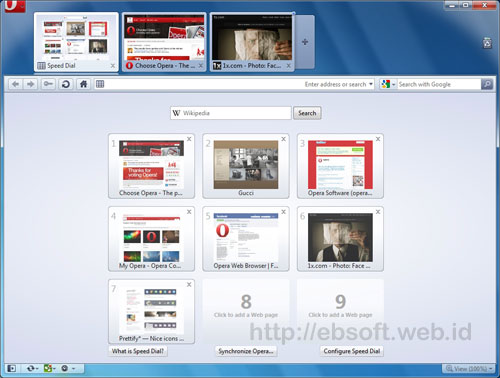
Opera 10.50, akankah menjadi web browser tercepat di dunia?

Baru saja (2 Maret 2010) Opera merilis web browser versi terbarunya, Opera 10.50. Rilis browser ini mungkin sedikit berbeda dengan sebelumnya, karena kali ini Opera menampilkan dengan menambahkan slogan “The world’s fastest browser for Windows” atau Browser tercepat di dunia untuk Windows. Juga “The fastest browser on Earth
Slogan tersebut memang membuat penasaran, selain juga berbagai fitur baru turut disertakan seperti HTML5, CSS3 dan lainnya.


Kaya dengan Fitur

Tidak dipungkiri lagi bahwa web browser ini memang kaya dengan fitur dan memang siap untuk menjadi browser kedepan. Beberapa fitur Opera 10.5 antara lain:
  • Opera Turbo, untuk mempercepat browsing internet dengan koneksi internet yang relatif lambat atau terbatas. Misalnya di jaringan WiFi yang ramai dan koneksi modem dial-up
  • Opera Unite, untuk berbagi (sharing) konten secara langsung dengan teman tanpa harus upload.
  • Opera Mail, menyertakan langsung email client.
  • Opera Widget untuk desktop.
  • Opera Dragonfly evolved, yang memungkinkan pengembang web untuk melakukan debug JavaScript, menganalisa CSS, DOM, HTTP header secara langsung.
  • Mouse Gesture, mengenali tindakan hanya dengan gerakan mouse.
  • Tampilan baru, termasuk efek Aero Glass untuk windows Vista dan Windows 7
  • Visual Tabs
  • Speed dial
  • Zoom
  • Content Blocking
  • Download Manager yang mendukung BitTorrent
  • Private Browsing
  • Fraud protection dan validasi sertifikat ( Extended Validation Certificates (EV) )
  • Kecepatan yang bertambah dengan Engine baru (disebut Carakan). Opera mengklaim sampai 7x lebih cepat dari pendahulunya.
  • Mendukung HTML5, CSS 2.1 dan CSS3
  • Tampilan di layar yang lebih baik (jelas dan lembut) dengan Vega Graphics Library
Fitur lebih lengkap dan penjelasannya silahkan langsung melihat Opera 10.50 Features

Test Kecepatan Browser

Penasaran dengan slogan “The world’s fastest browser”, saya mencoba membandingkan secara singkat kecepatan membuka beberapa website (kompas.com, microsoft.com dan wikipedia.org), dengan web browser lainnya seperti Mozilla Firefox 3.6, Google Chrome 5.0.335.1 dan Interner Explorer 8. Hasilnya (dengan setting bawaan), ternyata Opera masih terlihat sedikit lebih lambat dibanding lainnya.
Tetapi hasil test ini mungkin masih jauh dari akurat, karena dipengaruhi berbagai faktor dan selain juga namanya test singkat. Jadi kita tunggu saja review dari berbagai media dan pengguna internet, apakah memang Opera pantas menyandang sebagai browser tercepat. Bagaimana dengan anda ? sudah mencoba Opera terbaru atau tetap menggunakan browser lain ? Silahkan berbagi melalui komentar. (ebsoft)
Ingin mencoba browser baru ini ? Download Opera (9.4 MB)

sumber: disini

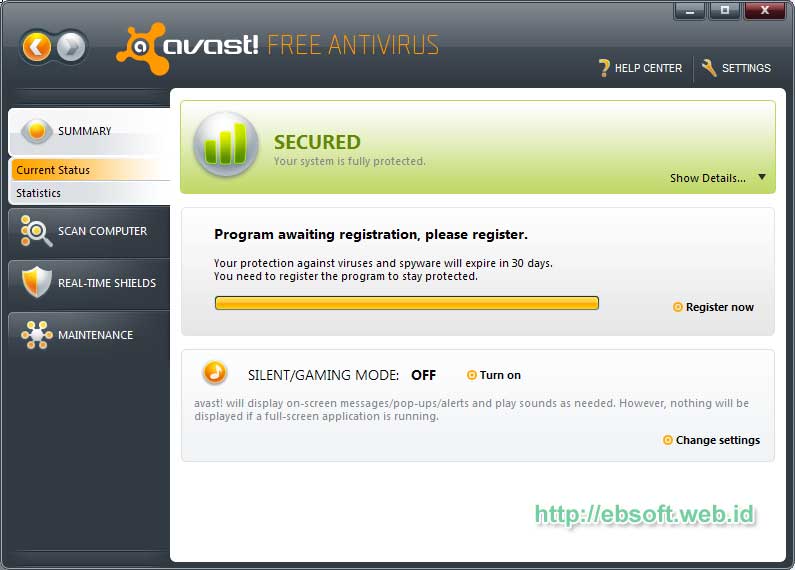
Avast 5.0: Penampilan baru, kinerja baru ..

Setelah banyak ditunggu, tidak hanya pecinta Antivirus Avast, tapi juga pengguna antivirus gratis, kemarin (19 Januari 2010) Avast merilis versi Antivirus terbaru, Avast 5, termasuk Avast Free Edition. Avast termasuk salah satu vendor antivirus yang menyediakan versi gratis (free) dengan fitur yang patut dipertimbangkan dibanding antivirus lainnya.
Di versi baru ini, Avast tampil dengan tambahan fitur baru dan perbaikan tampilan sebelumnya.

Selain produk gratis, avast juga merilis Pro Antivirus dan Internet Security. Perubahan yang sangat tampak adalah perubahan tampilan, selain itu sebelumnya Avast yang menamakan antivirus gratisnya dengan Avast Home Edition, kali ini berganti menjadi Avast Free Antivirus. Meskipun free edition, tetapi kemampuan proteksi dari malware sama dengan pro edition, yang membedakan lebih ke fiturnya dan opsinya.

Fitur-fitur Avast 5.0 Free Edition antara lain :
  • Proteksi dari virus dan spyware secara terus menerus
  • Memastikan email yang dikirim dan di terima aman.
  • Melindungi dari infeksi ketika sedang chatting
  • Melindungi dari website yang berbahaya, ketika browsing
  • Anti rootkit ( real time)
  • Web shield
  • IM/P2P shiled
  • Network Shield
  • Behavior shield
Fitur dan penjelasan lebih lengkapnya silahkan melihat Avast Free Download. Versi baru ini memberikan perbaikan pada engine Antivirus dan antispyware intelligent scanner, Silent/Gaming mode dan juga Behavior shield. Jika ingin mengetahui perbandingan antara Free Edition, Pro editian dan Internet Security, silahkan melihat Perbandingan Edisi Avast
Sistem minimal yang dibutuhkan:
* Processor Pentium 3, 128 MB RAM, 100 MB of free hard disk space
* Microsoft Windows 2000, Microsoft Windows XP/Vista/7 (32/64 bit)
Melihat fitur serta tampilan barunya, Avast 5.0 Free ini memang patut untuk dicoba, sebelumnya saya kurang suka dengan tampilannya yang seperti media player (meskipun skin bisa diganti). Tetapi kali ini tampilan tampak lebih segar. Bagi anda yang memerlukan antivirus gratis dengan fitur lengkap, Avast ini mungkin solusinya
Download Avast 5.0 Free Edition ( sekitar 38.3 MB)

sumber: here


Tera Copy: Membuat copy file menjadi lebih cepat

Sebelumnya saya tidak mengira jika proses copy file-file (dan folder) di windows bisa dipercepat dengan software. Sebelumnya saya mengira hanya bergantung dengan spesifikasi hardware (Hardisk, CPU, RAM dll). Tetapi ketika menemukan software gratis TeraCopy, apa yang selama ini saya ketahui ternyata salah.
Dengan TeraCopy, proses copy data terutama antar hardisk, dari CD/DVD ke hardisk atau flashdisk ke hardisk akan mengalami peningkatan.

TeraCopy merupakan program yang relatif kecil, bermanfaat dalam meningkatkan kecepatan ketika memindah atau copy file, terutama dari media yang satu ke media lainnya.

Beberapa Fitur TeraCopy
  • Copy file lebih cepat. Dari beberapa test, copy file dengan tera copy memang lebih cepat dari copy file biasa. Perbedaan bisa mencapai 20% lebih cepat. Hal ini karena teknik copy yang digunakan berbeda dengan windows.
  • Pause dan Resume proses copy. Jika copy file dengan bawaan windows, kita tidak bisa menghentikan proses copy kemudian melanjutkan setelah beberapa waktu
  • Error recovery. Jika terdapat error dalam copy file, TeraCopy akan mencoba membaca file tersebut beberapa kali. Jika tidak berhasil, file tersebut bisa diabaikan (skip) dan proses pemindahan tetap berlanjut.
  • Menampilkan daftar file lebih informatif, dan bisa menyimpan informasinya ke text file.
  • Shell Integration. Setelah di install TeraCopy otomatis mengganti proses Copy dari windows, sehingga kita bisa bekerja seperti biasa (Fitur ini dapat di non aktifkan)
  • Mendukung Unicode.
  • Selain mendukung Windows 32 bit, juga mendukung Windows 7 64 bit.
  • Proses Copy tetap berlangsung meski ada file yang tidak bisa di copy.

Beberapa Test Perbandingan

Berikut beberapa test yang saya lakukan untuk mengetahui perbedaan proses copy file + folder ketika menggunakan TeraCopy atau dengan bawaan windows.
Flash Disk ke Hardisk
Test berikut dilakukan dengan meng-copy data dari flashdisk ke hardisk ( 393 files, 34 folder, total sekitar 1 GB). Test di ulang 3-4 kali.
Bawaan Windows rata-rata 53 detik.
Dengan TeraCopy rata-rata 41 detik
Copy dalam satu Hardisk
Berikut test copy data dari drive yang berbeda dalam satu hardisk (disini dari drive H: ke drive C:). Jumlah file 10 buah dengan bersar masing-masing sekitar 200 MB ( total sekitar 2.1 GB)
Bawaan Windows : 1 menit 33 detik
Dengan TeraCopy : 1 menit 14 detik
Copy 16.274 files, 92 folder (total ukuran sekitar 38 MB). Ukuran files rata-rata 2 KB (bervariasi sekitar 1 KB sampai 50 KB)
Bawaan Windows : 1 menit 18 detik.
Dengan TeraCopy : 1 menit 18 detik.
Copy 1 file dengan ukuran sekitar 700 MB
Bawaan Windows: 27 detik
Dengan TeraCopy : 19 detik
Copy 2.765 files dengan total sekitar 1.25 GB
Bawaan Windows 1 menit 48 detik
Dengan TeraCopy 1 menit 38 detik
Hardisk ke Flashdisk
391 files, total 1 GB data
Bawaan Windows 3 menit 45 detik
Dengan TeraCopy 3 menit 51 detik
Dari beberapa Test diatas, secara umum copy data dengan TeraCopy memang lebih cepat di banding dengan proses bawaan windows. Pengecualian terjadi ketika copy data yang cukup besar dengan data yang ukurannya kecil-kecil yang tidak ada perbedaan waktunya. Selain itu juga Copy data ke Flashdisk, hal ini dikarenakan Flashdisk mempunyai daya tulis yang rendah dibandingkan hardisk, sehingga teknik yang digunakan tidak banyak bermanfaat untuk meningkatkan kecepatan.

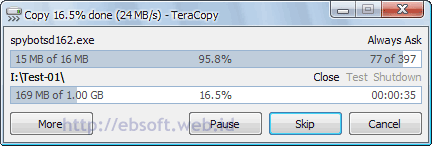
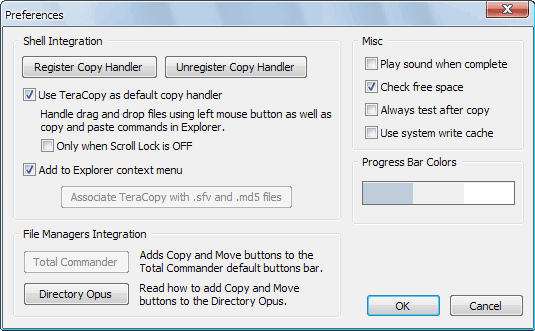
Setelah TeraCopy di install, maka ketika kita copy atau memindah file, operasi ini akan diganti dengan tampilan TeraCopy seperti gambar diatas. Untuk mengembalikan proses copy dengan windows biasa, selain di uninstall, bisa juga di non aktifkan melalui menu preference. Caranya, buka TeraCopy, klik Icon TeraCopy, lalu pilih Preference lalu hilangkan pilihan “Use TeraCopy as default copy handler” dan klik OK.
Download TeraCopy

sumber: here


USB Security 5.2.10

usb-security-5-2-10

USB Disk Security
100% protection against any threats via USB storage
USB Disk Security is a top-rated antivirus utility that protects your PC against threats from USB storage. We find and fix threats that your current security products missed…
Best solution to protect offline computer
Fastest and smallest antivirus software
Compatible with other security software
Compatible with all windows platforms
Very easy to use
Free upgrades
Product Highlights
100% protection against any malicious programs via USB drive
USB Disk Security uses innovative proactive technology to block any threats via USB drive. There are relatively few products available in shops or on the Internet which offer 100% protection against any malicious programs via USB drive. The majority of products are unable even to guarantee 90% protection. USB Disk Security is the world’s best software to block threats that can damage your PC or compromise your personal information from USB storage. It supports USB drive, flash disk, secure digital card, thumb drive, pen drive, removable storage, ipod, and more.
The best solution to protect offline computer
Other antivirus software should update signature database regularly, and they cannot effectively protect offline computer that is not connected to the Internet. When new viruses, worms and other malicious attacks strike, traditional signatures are insufficient. Every minute one waits for a virus signature update creates a window of vulnerability that could have devastating consequences. USB Disk Security uses advanced proactive detection techniques, requires no signature updates, and closes the window of vulnerability left open by other reactive, signature-based responses.
The world’s fastest and smallest antivirus software
With USB Disk Security, it’s not necessary to sacrifice speed for detection and scanning. Compare antivirus software and you’ll discover that USB Disk Security is by far one of the smallest applications in the industry. For example, the USB Disk Security installer is just 1 MB. The program utilizes approximately 1 to 7 MB of RAM.
Compatible with all antivirus software
Incompatibility between antivirus programs is an issue. In the vast majority of cases, installing two antivirus programs from different vendors on one machine (for increased protection) is technically impossible, as the two programs will disrupt each other’s functioning. However, USB Disk Security is 100% compatible with all security software.
Simple to use
USB Disk Security has been specifically designed to perform effectively regardless of the user’s level of computer expertise. Just install and forget it.
Password : www.hoaxfree.com
Download Now USB Security 5.2.10


Kaspersky Virus Removal Tool 30.01.2010

kaspersky-virus-removal-tool-30-01-2010

Kaspersky Virus Removal Tool 28.01.2010
| 60 MB
Another virus scanner and detection software from Kaspersky. The Kaspersky Virus Removal Tool application was designed to be another virus scanner and detection software from Kaspersky. The product will scan the specified locations for any virus threats and remove them or send to Quarantine folder.
Password : www.hoaxfree.com
Download Now Kaspersky Virus Removal Tool 30.01.2010


Apple Quicktime Pro 7.65.17.80 for XP, Vista, Win7

apple-quicktime-pro-7-65-17-80-for-xp-vista-win7
The QuickTime family of digital media creation, delivery and playback software lets you deliver live or pre-recorded video and audio to an audience of any size. When combined with QuickTime Player and QuickTime Pro, these applications work together to provide the industry’s first end-to-end, standards-based digital media delivery system.

QuickTime 7 is Apple’s cutting-edge digital media software for both Mac and Windows-based computers delivers unparalleled quality for creating, playing and streaming audio and video content over the Internet. Besides playing MPEG-4 and MP3 content, it supports timecode tracks as well as MIDI standards such as the Roland Sound Canvas and GS format extensions. It also supports key standards for web streaming, including HTTP, RTP and RTSP. Plus, it supports every major file format for images, including JPEG, BMP, PICT, PNG and GIF. QuickTime 7 features an ultra efficient new H.264 video codec delivering stunning quality at remarkably low data rates from 3G to iChat AV to HD.
New features in QuickTime 7 Player for Windows:
- H.264 video playback. Watch movies created with this state-of-the-art, standards-based codec, which delivers exceptional-quality video.
- Surround sound. With QuickTime 7, your PC, and surround speakers, you can enjoy the full effect of your surround sound game or movie.
- New and improved playback controls. Easily change settings including jog shuttle, playback speed, bass, treble, and balance.
- Zero-configuration streaming. QuickTime automatically determines your optimal Internet connection speed and reconnects dropped connections.
- Live resize. Playback continues smoothly as you change the size of the QuickTime Player window
New features in QuickTime 7 Pro for Windows:
- Create H.264 video. Create incredible-looking video for any use, from 3G for mobile devices to HD.
- Create surround audio. Create a rich multimedia experience by adding multichannel audio to your movie.
- Floating controls. Easily access functions like pause, play, fast-forward, and rewind while watching full-screen movies.
- Background exporting. Export your movie in the background and continue with your next playback or editing task.
- Improved movie authoring. The all-new Movie Properties facilitates simple and efficient movie authoring.
- Automate with VB Script. Automate your QuickTime workflow with native VB Script support in QuickTime 7. Developers can also use VB Script to access the new QuickTime Active X control for creating custom multimedia applications.
Compatible with: Windows XP / Vista and Win7 (32/64-bit)
Multilingual: English, Spanish, French, Italian, Portuguese, etc
Password : www.hoaxfree.com
Download Now Apple Quicktime Pro 7.65.17.80

ConvertX to DVD 4.0.9.322a

convertx-to-dvd-4-0-9-322a

Key Features:
Video formats supported: avi, divx, xvid, mov, mkv, flv , mpeg1, mpeg2, mpeg-, nsv, dvr-ms, ts, ifo, vob, asf, wmv, realmedia, rm, rmvb, ogm, existing files from digital camcorders, TV/Sat, capture cards, etc. No external codecs needed like avi codec
Create DVD menus with different templates available, possibility to add background video, image or audio, have chapter and audio/subtitle menus
Conversion advisor wizard, control of the conversion speed vs. quality
Fast and quality encoder, typically less than 1 hour for converting 1 movie, and supports Multi-Core processors!
Included burning engine with burn speed control choice of SAO or packet writing methods, supports all DVD formats
Custom and or automatic chapter creation with markers and preview window
Advanced file merging possibilities
Audio formats supported internal and external: AC3, DTS, PCM, OGG, MP3, WMA and more…
Subtitles files supported internal and external: SRT, .SUB/IDX, .SSA, opensubtitles, dvbsub with color and font selection, and supports tags like italic, bold, turn on/off with DVD player remote control
Video output for video standard (NTSC, PAL), TV Screen (Widescreen 16:9, Fullscreen 4:3) and DVD Resolution (Full D1, Broadcast D1, Half D1, SIF), or choose automatic for all choices listed above. Also convert video from NTSC to PAL or PAL to NTSC
Video post processing settings like video resize-pad/cropping and de-interlacing options
Multilingual support
Works with 32 and 64bits edition of Windows XP, Vista, 7
Password : www.hoaxfree.com
Download Now ConvertX to DVD 4.0.9.322a


Crash Boom Bang!

Crash Boom Bang!

Crash Boom Bang!
NDS | ROM 0603 | USA | 24 Mb
Roll the dice and dive into one of the 40 multiplayer action-oriented mini-games, where you can communicate with other players through the revolutionary DS Touch Panel Communication.
Password : www.hoaxfree.com
Download Now Crash Boom Bang!